
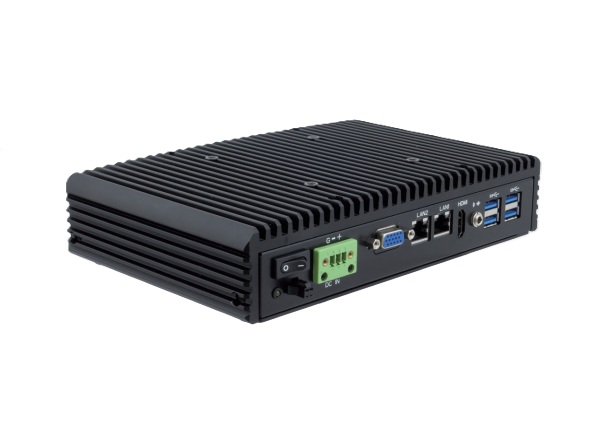
One of the most important design decisions in industrial computing is cooling. While traditional computers rely on fans to move air across heat-generating components, fanless industrial PCs use passive cooling to achieve the same goal — without any moving parts.
This guide explains how fanless cooling works, why it's critical for industrial and commercial applications, and what to consider when selecting a fanless system.
How Do Fans Fail in Industrial Environments?
In an office, a CPU fan might last 3-5 years before degrading. In an industrial environment, fans face accelerated wear from:
- Dust and particulates: Manufacturing dust, sawdust, metal shavings, and flour clog fans within months
- Oil mist: CNC machines, food processing, and automotive environments coat fan blades and bearings
- Temperature extremes: Fan bearing lubricants break down in extreme heat or cold
- Vibration: Continuous vibration causes fan bearing failure
When a fan fails, the CPU throttles performance or overheats entirely — causing system crashes, data loss, and unplanned downtime.
How Passive Cooling Works
Fanless industrial PCs replace mechanical air cooling with conductive heat transfer:
1. Thermal Interface Materials (TIM)
High-conductivity thermal pads or paste connect the CPU and other heat-generating components directly to the chassis. These materials transfer heat efficiently from the chip to the enclosure.
2. Heat Pipe Technology
Many fanless designs use copper heat pipes — sealed tubes containing a small amount of coolant that evaporates at the hot end and condenses at the cool end, rapidly moving heat away from the processor.
3. Heat-Sink Chassis
The entire outer enclosure acts as a giant heat sink. Aluminum or copper alloy chassis with machined fins maximize surface area for heat dissipation into the surrounding air through natural convection.
Performance: Can Fanless Compete?
Modern fanless industrial PCs have largely eliminated the performance tradeoff:
| Processor Class | Typical TDP | Fanless Capable? | Use Case |
|---|---|---|---|
| Intel Atom / Celeron | 6-10W | Yes (compact chassis) | Edge gateway, thin client, signage |
| Intel Core i3 / i5 | 15-28W | Yes (finned chassis) | HMI, SCADA, machine vision |
| Intel Core i7 / i9 | 28-65W | Yes (large heat-sink chassis) | AI inference, video analytics |
Benefits Beyond Reliability
Silent Operation
Fanless PCs produce zero acoustic noise, making them ideal for hospitals, recording studios, retail point-of-sale, and libraries.
Sealed Enclosure
Without fan vents, the enclosure can be completely sealed against dust (IP6x), water splash (IPx5/x6), chemical exposure, and explosive atmospheres.
Reduced Maintenance
No fans means no fan replacement schedule, no compressed air cleaning, and lower total cost of ownership.
Smaller Form Factor
Eliminating the fan assembly allows for more compact enclosures. Many fanless systems are small enough for DIN rail mounting or behind-display installation.
Thermal Considerations for Deployment
Ambient Temperature
Fanless systems rely on the surrounding air being cooler than the chassis. Check the rated operating temperature range and ensure it matches your deployment environment.
Mounting Orientation
Heat rises. Mounting a fanless PC with its fins oriented vertically provides the best natural convection. Horizontal or inverted mounting may reduce thermal performance by 10-15%.
Airflow
While the system itself needs no fan, it still needs some ambient airflow. Avoid mounting in fully sealed, unventilated enclosures.
Acnodes Corporation designs and manufactures fanless industrial PCs for the most demanding environments. Browse our product catalog or contact us for application-specific recommendations.